Batteries, heat, and tethered phones: keeping your eclipse-day toolkit from melting down
Your phone may be your map, camera, ticket wallet, weather display, group-chat hub, and emergency contact on eclipse day. That makes it useful—but also unusually easy to overwork. Bright screens, navigation, weak mobile signals, video, photo bursts, and charging all generate or retain heat. Add direct August sunshine and a power bank trapped in a bag, and a perfectly healthy device may slow down, dim its screen, suspend charging, or shut off just when the sky begins to change.
The solution is not to carry a miniature power station. It is to reduce avoidable demand, keep batteries shaded, and rehearse the few functions you actually need. Start by saving your location in the Helioclipse Eclipse Explorer, noting whether you are inside or outside totality, and taking screenshots of the key timing information in case mobile service becomes congested.
This eclipse day power bank phone battery charging august heat guide is built around one priority: people need shade, water, and safe solar viewing before devices need electricity. A missed photograph is disappointing. Heat illness or unsafe viewing is much more serious.
Why an August eclipse is hard on electronics
The total solar eclipse occurs on August 12, 2026. Its path of totality crosses parts of Greenland, Iceland, and Spain; places including Reykjavík, Bilbao, Zaragoza, and Palma are associated with the total-eclipse corridor, while much of western Europe sees a partial eclipse. Exact circumstances vary sharply with location, so use the map for your chosen observing point rather than relying on a national or citywide headline.
In Spain, the event takes place late in the day, when the Sun is relatively low and some observing sites may still be carrying hours of accumulated summer heat. Low solar altitude also makes an unobstructed western horizon important. In Iceland and Greenland, the thermal problem may be less intense, but wind, moisture, and remote-site logistics create different battery demands. The August 12, 2026 planning guide covers the larger event; this guide concentrates on the electronics sitting beside you.
Questions such as what time is the solar eclipse on august 12, 2026 cannot be answered responsibly with one clock time. First contact, maximum eclipse, totality, and last contact are different moments, and local time zones apply. A search result labeled solar eclipse 2026 time may also describe a different city or only the instant of greatest eclipse worldwide. Check the map pin for your actual site and record the local times for the phases you intend to photograph.
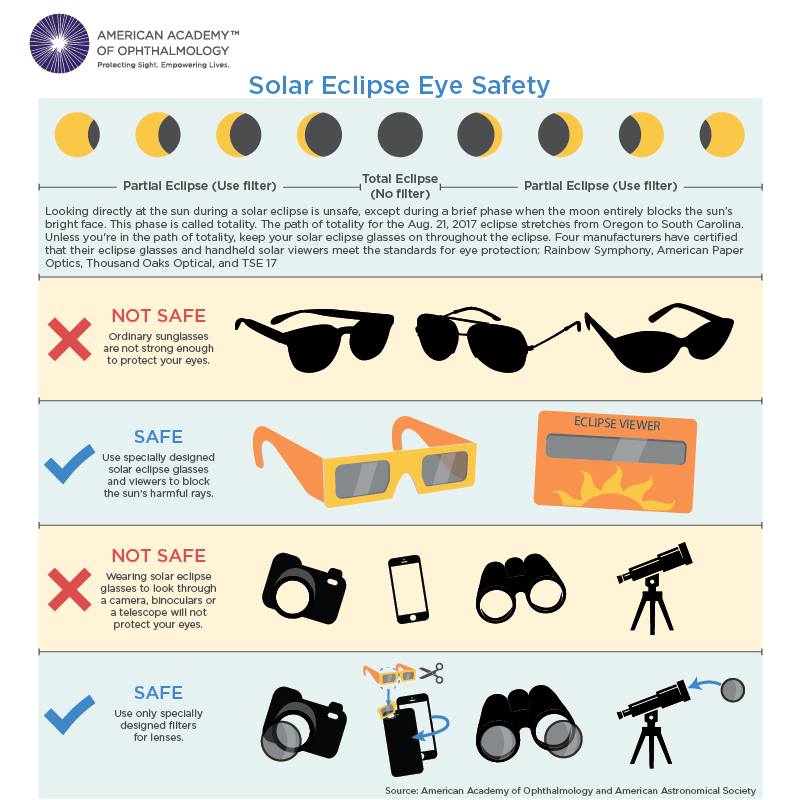
The total solar eclipse 2026 path matters for device planning too. Inside totality, you may want a short automatic video or a carefully rehearsed sequence. Outside the path, the event remains partial: there is no glasses-off interval, and a camera pointed at the Sun needs a suitable front-mounted solar filter throughout. Do not let a generic lunar eclipse 2026 reminder confuse the issue; lunar eclipses are safe to watch directly, but solar eclipses require dedicated eye protection except during true totality.
Can the Sun drain your phone battery?
Can the sun drain your phone battery? Not by shining some special eclipse-day radiation into it. The practical drain comes from what sunlight and heat make the phone do: raise screen brightness, manage its temperature, search for a weak network, run navigation, process images, and record high-resolution video.
An eclipse phone battery can therefore fall much faster than it does during an ordinary afternoon at home. Continuous camera preview keeps the display, image sensor, and processor active. Burst photography adds rapid processing and storage writes. Video demands still more sustained work, while uploading clips over a crowded mobile network can consume energy without delivering anything useful.
Heat compounds the problem. Lithium-ion batteries work through temperature-sensitive chemical reactions. High temperatures can accelerate long-term aging, while the phone’s protective software may dim the display, reduce performance, pause camera features, or stop charging temporarily. That behavior is inconvenient, but it is the device protecting itself.
There is no universal outdoor temperature at which every phone or power bank becomes unsafe. Limits differ by manufacturer, model, battery condition, case, airflow, solar exposure, and whether the device is charging. Follow the operating-temperature guidance for your equipment. If you see a thermal warning, charging stops unexpectedly, the enclosure becomes unusually hot, or a battery swells, hisses, leaks, or smells strange, disconnect it and move people away from it. Do not puncture it, squeeze it, or put it on ice.
Shade first, charging second
The most useful piece of practical electronics hygiene—shade for devices, realistic battery eclipse plann—can be rescued from that clipped wording as a simple rule: prevent heat before trying to charge through it. Charging creates additional heat, so plugging a sun-baked phone into a sun-baked power bank can make both devices less capable rather than more.
Use passive shade with airflow. A light-colored cloth canopy, open-sided box, or shaded table can keep direct sunlight off equipment without sealing heat inside. Do not leave batteries on a vehicle dashboard, under a windshield, in a closed car, or buried beneath insulating clothes. A black zippered case in full sun is not meaningful shade.
Your own shade and hydration come first. Do not abandon a safe viewing place to hunt for an electrical outlet, and do not occupy an exposed car park simply because the vehicle has a charging socket. During the partial phases you may be outside for hours, so bring water, a hat, sunscreen, suitable clothing, and a place for children or older relatives to rest.
Use this heat-and-shade check before charging:
- Touch and inspect both devices. A warm battery is not automatically dangerous, but a thermal warning, deformation, unusual odor, leakage, or extreme heat means stop.
- Move the phone and power bank out of direct sun. Keep air moving around them; do not wrap them tightly together.
- Remove a heavy case if the phone is struggling to cool. Keep the phone on a clean, dry surface where it cannot be stepped on.
- Pause demanding tasks. Stop video, navigation, uploads, and games while the device cools.
- Let protective systems work. If charging is paused because of temperature, do not repeatedly reconnect the cable to override the warning.
- Avoid abrupt chilling. A refrigerator, freezer, ice pack, or wet towel can create condensation and damaging temperature stress.
Size the power bank from a rehearsal, not a marketing number
An eclipse battery pack should be chosen for a measured workload. Battery capacity printed in milliamp-hours does not translate directly into a guaranteed number of phone charges: the cells and phone operate at different voltages, and conversion, cable resistance, temperature, and charging overhead all consume energy.
Run a 30-minute rehearsal several weeks before the eclipse. Put the phone in the brightness mode you expect to use, open your saved map, record the planned amount of video, take several photo bursts, and leave navigation running if it will be needed. Record the battery percentage before and after. Multiply that demand by the number of half-hour blocks in your active plan, then add a generous reserve—ideally enough to preserve communication and navigation after photography stops.
That test is more useful than trying to buy an eclipse energy battery, which is not a distinct technical product category. Likewise, an eclipse phone charger or eclipse battery charger is simply a compatible, reputable charger used in an eclipse plan. Look for clear capacity and output labels, intact ports, appropriate cables, and the safety documentation required in your market. Do not use a damaged, swollen, recalled, or untraceable pack.
Modern charging systems usually reduce current as a battery fills, and reputable power banks include protection circuitry. That does not make an unattended charging stack sensible in direct sun. Once you have enough power for the event and the journey home, disconnect the cable and separate the devices so they can shed heat.
Tethered phones need cable discipline
A phone tethered to a power bank can become an eclipse-day tripwire. Long cables snag on tripod legs, catch feet, and pull phones from clamps. Short, correctly rated cables are easier to manage and lose less energy than a needlessly long lead.
If you must charge while using a tripod, secure the power bank independently; do not let it hang from the phone’s charging port. Leave enough slack for adjustment, but route the cable down a tripod leg and fasten it with reusable straps. Keep connectors dry and out of dust or sand. Never place a battery where a chair leg, car tire, or crowd can crush it.
Wireless charging is convenient indoors, but it can waste more energy as heat than a well-matched cable. On a hot observing site, a cable is usually the more controllable option. Better still, charge in the shade before the key phase begins and unplug for the final countdown.
A small label also helps in a group. Mark each power bank and cable with an owner’s name, and agree which pack is reserved for communication. Otherwise, a family can quietly use its last reserve topping up one person’s video phone while the navigation device approaches zero.
Photograph less, prepare more
You can photograph a solar eclipse with a phone, but the safest and most rewarding plan is usually modest. Clear storage beforehand, disable unnecessary cloud uploads, clean the lens, learn how to lock focus and exposure, and practice with the tripod and trigger. Reviewing dozens of test shots in direct sunlight wastes both time and battery; assess them in shade.
For partial phases, a phone camera aimed at the Sun needs a suitable solar filter securely covering the front of the camera optics. Solar viewers made for your eyes and filters made for cameras are not automatically interchangeable products. ISO 12312-2 applies to nonmagnifying viewers intended for direct visual observation; do not casually treat that marking as a complete camera-filter specification.
The same distinction protects your eyes. Solar eclipse glasses are not camera filters, and wearing them does not make it safe to look through unfiltered binoculars, telescopes, or other magnifying optics. Concentrated sunlight can damage the viewer and your eye. Read our guide to eclipse phases and when to use solar viewers before building a photography sequence.
Only observers inside the path of totality may look without solar viewers during the brief interval when the Moon completely covers the Sun’s bright face. Glasses go back on as soon as any bright photosphere reappears. Outside totality—including every partial-eclipse location—certified viewers remain necessary whenever you look directly at the Sun.
For a first total eclipse, consider recording a wide-angle video of your group rather than chasing a tiny close-up of the Sun. Start it shortly before totality, leave it alone, and let it capture the changing light, reactions, and sound. That approach uses some battery, but it also keeps your hands and attention free for the event itself.
A 24-hour electronics checklist
The day before
- Download offline maps and save screenshots of the route, parking point, meeting place, eclipse contacts, and local phase times.
- Confirm the difference between your meeting time and the astronomical contact times.
- Charge phones, cameras, power banks, watches, and accessibility equipment indoors at a normal room temperature.
- Install updates early—not on eclipse morning—and restart each phone after testing.
- Clear enough storage for planned video and photo bursts.
- Pack short cables, adapters, a tripod or clamp, and a remote trigger if used.
- Switch off automatic photo backup and other background transfers that can wait.
- Inspect batteries for swelling, cracked cases, damaged ports, or recall notices.
- Inspect every solar viewer and discard any with torn, punctured, scratched, or detached filter material.
At the observing site
- Establish shade for people before arranging the charging station.
- Put phones into low-power mode unless that disables a function you have tested and need.
- Reduce screen brightness manually when practical and shorten the screen timeout.
- Use airplane mode when you do not need a connection; offline maps and downloaded timing notes will still be available.
- Assign one phone as the primary navigation and emergency device and preserve its reserve.
- Keep batteries off hot ground, dashboards, and exposed metal tables.
- Set alarms for key phases, but verify that they use the correct local time zone.
- Stop troubleshooting before totality. A cable problem is not worth missing the shadow.
After the eclipse
- Wait for hot equipment to cool naturally before charging it in a bag or vehicle.
- Keep enough phone power for traffic changes, navigation, and contacting your group.
- Back up images after reaching a cool, stable location rather than forcing uploads over a congested network.
- Recheck the site for small cables, battery packs, viewer wrappers, and tripod parts.
Flying with a power bank
Power banks contain lithium batteries and are treated as spare batteries for air travel. Under current US Federal Aviation Administration guidance, power banks belong in carry-on baggage rather than checked baggage. Capacity and airline-approval rules can apply, particularly above 100 watt-hours, and other aviation authorities may use their own requirements.
Read the watt-hour figure printed on the pack before leaving home. If only amp-hours and nominal voltage are shown, watt-hours are calculated as Ah × V; 10,000 mAh is 10 Ah. Do not assume airport staff will accept an unlabeled or damaged battery, and do not rely on an old travel article. Check the current rules of your departure country, connection airports, and operating airline before packing.
Protect exposed terminals from short circuits and keep each pack accessible in the cabin. If a battery becomes hot, swells, smokes, or smells unusual during a flight, tell cabin crew immediately rather than handling the situation alone.
Product language that should not mislead you
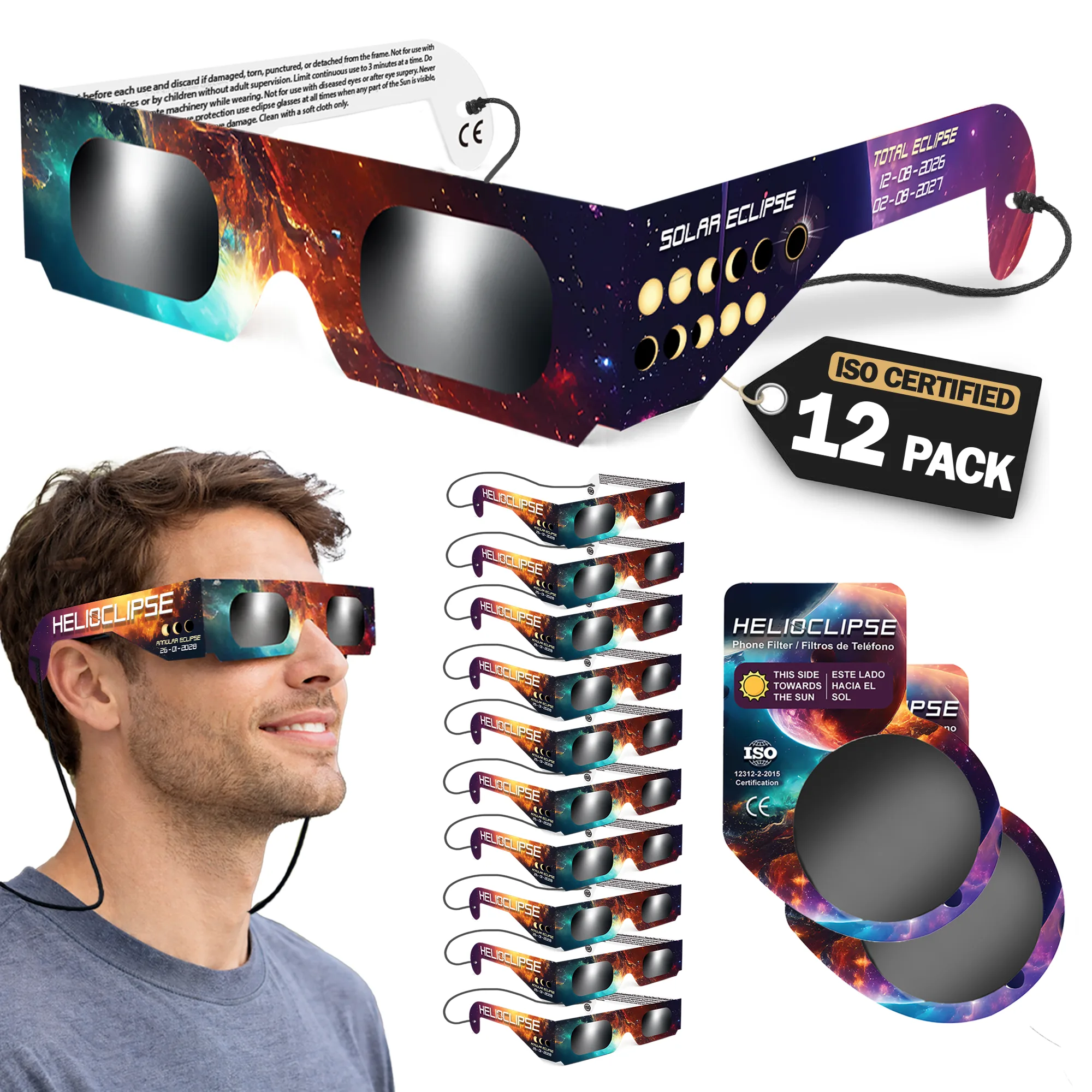
Battery preparation does not replace safe viewing equipment. When buying for a family or school group, phrases such as solar eclipse glasses iso 12312-2 certified and certified solar eclipse glasses should lead you to inspect the seller, instructions, condition, and evidence behind the claim—not merely trust text in a marketplace title.
Be especially cautious with wording such as approved solar eclipse glasses or eclipse glasses nasa approved. NASA publishes safety guidance but explicitly says it does not approve particular viewer brands. Choose purpose-made viewers represented as conforming to ISO 12312-2, obtain them from a trustworthy source, and inspect every pair before use. Our Helioclipse solar eclipse glasses page provides the product details you need to plan quantities early.
The simplest reliable plan
You do not need to keep every device at 100 percent. You need enough reserve to navigate, communicate, record one or two meaningful moments, and get home safely.
A strong plan looks like this:
- Save the site, route, local eclipse times, and backup location offline.
- Rehearse the camera workload for 30 minutes and measure its actual drain.
- Begin eclipse day with charged devices rather than planning to refill everything outdoors.
- Keep phones and batteries shaded, ventilated, dry, and physically protected.
- Reserve one phone and one power source for communication and navigation.
- Automate one simple recording, then stop touching the screen before the most important phase.
- Put personal shade, hydration, eye safety, and the live experience ahead of outlets and battery percentages.
That is the heart of batteries, heat, and tethered phones: keeping your eclipse-day toolkit from becoming the main event. The technology should quietly support the day—not consume it.
Frequently asked questions
Can I use my phone to photograph the solar eclipse?
Yes, but keep the setup simple and rehearse the functions you actually need. Video, photo bursts, bright screens, navigation, weak signals, and charging can heat the phone, so reduce avoidable demand and keep the device shaded.
How can I watch the eclipse safely while managing my phone and battery?
Put people first: shade, water, and safe solar viewing are more important than powering devices or getting a photograph. Keep phones and power banks out of direct August sun, and save key location and timing details in advance so you do not need to rely on congested mobile service.
Does this guidance apply to a lunar eclipse in 2026?
This excerpt addresses the total solar eclipse on August 12, 2026, not a lunar eclipse. Its advice focuses on phone heat, battery demand, charging, and location-specific timing for that solar-eclipse day.
What time will the solar eclipse occur on August 12, 2026?
There is no single responsible clock time for the eclipse because first contact, maximum eclipse, totality, and last contact are different moments, and local time zones vary. Check the map pin for your exact observing site and record the local times for the phases you plan to watch or photograph.
Can I rely on a general search result for the 2026 solar eclipse time?
No. A general result may refer to another city or only to the instant of greatest eclipse worldwide, rather than the circumstances at your location. Use the map for your chosen observing point, since eclipse conditions vary sharply by site.
On-site next steps
- Pin your intended location in the Helioclipse Eclipse Explorer and save its local phase times, path status, and horizon context.
- Review the wider 2026 eclipse planning guide with everyone in your group.
- Order enough ISO 12312-2 eclipse viewers from Helioclipse for your plan, then store them flat, clean, and dry until inspection on eclipse day.
Sources & further reading
- How to photograph the upcoming solar eclipse with a smartphone — Space.com
- How to Use Your Smartphone to Shoot a Solar Eclipse — Sky & Telescope
- How to Shoot Solar-Eclipse Images & Videos — American Astronomical Society
- Keep iPhone, iPad, and iPod touch within acceptable operating temperatures — Apple Support
- PackSafe: Lithium Batteries — Federal Aviation Administration
- Eclipse Viewing Safety — NASA Science
- How to View a Solar Eclipse Safely — American Astronomical Society
- About the ISO 12312-2 Standard for Solar Viewers — American Astronomical Society
- Eclipses — NASA Science
- Total Solar Eclipse FAQ — NASA Science